
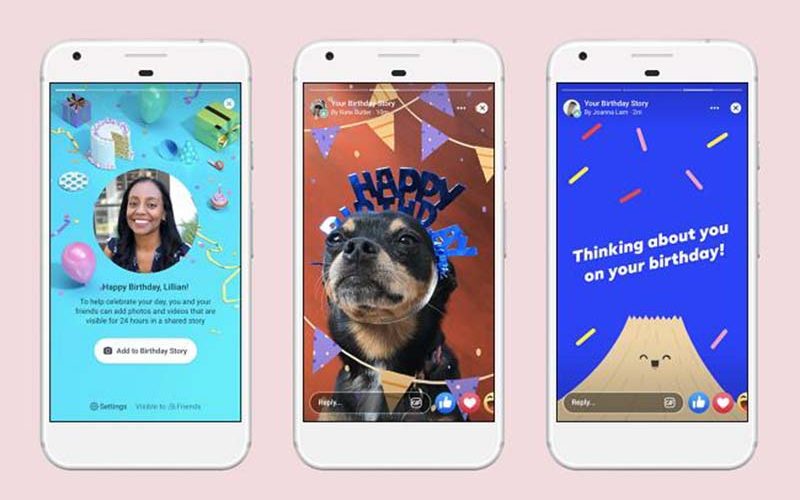

How to See Who Viewed Your Facebook Story
Facebook Stories have become one of the most popular ways to share quick updates, daily moments, and behind‑the‑scenes glimpses with friends and followers. Stories appear at the top of the Facebook app and disappear after 24 hours — but during that time, Facebook tracks exactly who viewed them.
If you’ve ever wondered:
- Who viewed my Facebook Story?
- What does “Others” mean on Facebook Story views?
- Can I control who sees my Story?
- Can I view Stories anonymously?
…this guide covers everything you need to know.

What Is a Facebook Story and How Does It Work?
A Facebook Story is a temporary post — photo, video, text, boomerang, or music clip — that disappears after 24 hours. Stories appear:
- At the top of the Facebook News Feed
- On your profile
- In Messenger
You can add:
- Filters
- Stickers
- GIFs
- Effects
- Music
- Text overlays
Unviewed Stories show a blue ring around your profile picture. Once viewed, the ring disappears.
Facebook Stories can be shared with:
- The public
- Friends
- Custom lists
- Specific people
And yes — Facebook tracks who views your Story.
Can You See Who Viewed Your Facebook Story?
Yes. Facebook allows you to see exactly who viewed your Story within the 24‑hour period.
However:
- Facebook does not notify you if someone views your Story multiple times
- Facebook does not notify you if someone screenshots your Story
- Facebook does not show the identity of “Other” viewers
Let’s walk through how to check your viewers.
How to See Who Viewed Your Facebook Story
This method works on:
- Android
- iPhone
- Desktop (facebook.com)
Steps to Check Story Viewers
- Open the Facebook app or visit facebook.com
- Go to your Feed
- Tap Your Story
- Look at the bottom‑left corner
- Tap Viewers (or swipe up on mobile)
You’ll now see:
- A list of people who viewed your Story
- A count of “Others” (if applicable)
What Does “Others” Mean on Facebook Story?
If you’ve ever seen “Others” in your Story viewer list, you’re not alone. Many users wonder who these “Other” viewers are.
Who Are “Others”?
“Others” refers to people who viewed your Story but cannot be identified by name. This includes:
- People who follow you but are not your friends
- People who viewed your public Story but are not connected to you
- People who blocked you after viewing your Story
- People with strict privacy settings
Example
If you see Others (1), it means:
- One person viewed your Story
- They are not on your friend list
- Or they blocked you afterward
- Or their privacy settings hide their identity
Can You See Who “Others” Are?
No. Facebook does not reveal the identity of “Other” viewers for privacy reasons.
The only exception: If someone blocked you after viewing your Story and later unblocks you, their name may appear again in your viewer list.
How to Manage Who Can View Your Facebook Story
Privacy matters — especially when Stories can be viewed by strangers if set to Public. Facebook gives you full control over who can see your Stories.
You can change Story privacy in two ways.
Option 1: Change Story Privacy From the Story Itself
- Open your Story
- Tap the three dots (top‑right)
- Select Edit story privacy
- Choose your audience:
- Public
- Friends
- Custom
Option 2: Change Story Privacy From Settings
- Tap the menu (three lines)
- Tap the Settings (cog icon)
- Scroll to Stories
- Tap Story Privacy
- Select:
- Public
- Friends
- Custom
This applies to:
- Stories posted within the last 24 hours
- All future Stories
How to View Facebook Stories Anonymously
Sometimes you may want to watch someone’s Facebook Story without appearing in their viewer list. While Facebook does not offer an official “anonymous view” mode, several workarounds make it possible.
Below are the most commonly used methods.
1. Turn On Airplane Mode Before Viewing
This is the simplest trick.
How it works
- Open Facebook and let Stories load
- Turn on Airplane Mode
- View the Story
- Close the Facebook app completely
- Turn off Airplane Mode
Because the app cannot send data while offline, your view may not register.
Limitations
- Not 100% reliable
- Works best when you force‑close the app afterward
2. Half‑Swipe the Story Preview
This method lets you “peek” at a Story without fully opening it.
How to do it
- Open the Stories row
- Tap the Story before or after the one you want to view
- Slowly drag (half‑swipe) toward the Story you want to see
- Do not release your finger
- Swipe back
This allows you to preview the Story without triggering a view.
Limitations
- Only works for static images
- Not reliable for videos or multiple slides
3. Block the User After Viewing
This method works because Facebook removes your name from the viewer list once you block someone.
Steps
- View the Story normally
- Immediately block the user
- Wait until the Story expires (24 hours)
- Unblock them later
Important
- Blocking removes your name from the viewer list
- You will lose access to their profile temporarily
4. Use Browser Extensions (Desktop Only)
Some browser extensions claim to allow anonymous Story viewing. However:
- Many are unreliable
- Some violate Facebook’s terms
- Some may pose privacy risks
Use caution if you choose this method.
SpyZee: A Family‑Safe Way to Monitor Facebook Activity
While anonymous viewing may be useful for privacy, parents often need a more structured way to monitor their child’s Facebook activity — especially with the risks of strangers viewing or interacting with Stories.
This is where SpyZee Parental Control becomes helpful.
SpyZee is a consent‑based, family‑friendly monitoring tool designed to help parents understand their child’s digital environment responsibly.
How SpyZee Helps Parents Monitor Facebook Safely
- Screen Mirroring: View your child’s Facebook screen in real time
- Notification Monitoring: See incoming Story replies and interactions
- Activity Insights: Understand how often Facebook is used
- Safety Alerts: Detect suspicious behavior or unknown contacts
SpyZee is available on the Google Play Store, making it accessible for families who want a balanced, non‑intrusive approach to digital safety.
Conclusion
Facebook Stories are a fun and engaging way to share moments with friends, family, and followers. And yes — Facebook gives you full visibility into who viewed your Story, as long as it’s within the 24‑hour window.
To recap, you can:
- Check Story viewers by opening your Story and tapping Viewers
- Understand that “Others” refers to non‑friends or people who blocked you
- Manage Story privacy through Settings or directly from the Story
- View Stories anonymously using offline or half‑swipe tricks
- Use SpyZee to help protect children from unwanted Story viewers
Stories are meant to be fun — but privacy matters. With the right settings and awareness, you can enjoy Facebook Stories while staying in control of who sees your content.
FAQs — Facebook Story Views
1. Why can’t I see who viewed my Facebook Story?
Possible reasons include:
- No one has viewed your Story yet
- Your Story audience is set incorrectly
- The Story has expired
2. Does Facebook notify users when you screenshot a Story?
No. Facebook does not notify users about screenshots.
3. How do I see old Facebook Stories?
Enable Story Archive:
- Go to Settings
- Tap Stories
- Select Story Archive
- Turn on Save to archive
Your Stories will be saved automatically.
4. Can I view Facebook Stories anonymously?
Yes — using methods like:
- Airplane Mode
- Half‑swipe preview
- Blocking after viewing
- Certain browser extensions
5. What does “Others” mean on Facebook Story views?
“Others” includes:
- Followers who are not friends
- People with strict privacy settings
- People who blocked you after viewing
6. Can SpyZee help monitor Facebook activity?
Yes. SpyZee provides screen mirroring and activity insights to help parents monitor Facebook usage responsibly.



Add comment