
Realizing your smartphone is missing is a heart-dropping moment. Whether it slipped out of your pocket on the subway or was swiped from a cafe table, the immediate panic is understandable. Our phones hold the keys to our digital lives—banking apps, personal photos, emails, and sensitive communications.
However, a missing phone does not have to mean a permanent loss or a compromised identity. Modern operating systems, both Android and iOS, are equipped with sophisticated, free, built-in tracking technologies designed for exactly this scenario.
This comprehensive guide will walk you through the precise steps to locate a lost or stolen Android device or iPhone. We will explore how to use native tracking networks, how to trigger remote alarms, and, crucially, the immediate actions you must take to protect your private data if the phone cannot be recovered.
Critical First Steps Before Tracking
Before diving into complex tracking dashboards, start with the most obvious and immediate solutions:
-
Call the Phone: Borrow a friend’s device and dial your number. If the phone was simply misplaced nearby, you might hear it ringing. If a good Samaritan found it, they might answer.
-
Use a Smart Speaker: If you are at home and suspect the phone is buried under laundry or wedged in the couch, ask your smart speaker for help. Saying, “Hey Google, find my phone” or “Siri, where is my iPhone?” will force the device to ring loudly, even if it is set to silent or vibrate mode.
If these immediate steps fail, it is time to transition to digital tracking.
How to Track a Lost or Stolen Android Phone
Google provides a universal tracking system for all Android devices, while major manufacturers like Samsung offer their own robust parallel networks.
1. Using Google “Find My Device”
This is the primary method for locating any modern Android smartphone. It is built directly into the operating system and is tied to your Google Account.
Prerequisites: For this to work, the missing phone must be powered on, connected to mobile data or Wi-Fi, and have location services enabled.
How to Use It:
-
On any computer or secondary smartphone, open a web browser and go to
android.com/find. -
Log in using the exact Google Account credentials associated with the missing phone.
-
If you have multiple devices, select the missing phone from the top menu.
-
A map will display the phone’s current location (or its last known location if it recently lost connection).
From this dashboard, Google gives you three critical options:
-
Play Sound: Rings the device at maximum volume for five minutes, bypassing silent mode.
-
Secure Device: Locks the phone with your PIN or password and logs you out of your Google Account. You can also display a custom message (e.g., “Please call me at [Number]”) directly on the lock screen.
-
Erase Device: The nuclear option. This wipes all data from the phone permanently. Note that once erased, you can no longer track it.
Note: You can also use the official Find My Device app on a friend’s Android phone by selecting the “Sign in as guest” option.
2. Using Samsung “SmartThings Find”
If you own a Samsung Galaxy device, you have access to one of the most powerful tracking networks available. Samsung’s system can often locate a phone even if it is completely disconnected from Wi-Fi or cellular data.
How to Use It:
-
Navigate to
smartthingsfind.samsung.comon a web browser. -
Log in with your Samsung Account credentials.
-
Select your missing device from the sidebar.
-
The map will display the location.
Samsung’s unique advantage is its Offline Finding network. If your lost Galaxy phone is offline, it emits a secure Bluetooth signal. Other nearby Samsung devices belonging to strangers will silently pick up this signal and report your phone’s location to Samsung’s servers, updating your map anonymously. Furthermore, this portal allows you to remotely back up your data to Samsung Cloud before executing a remote wipe.
3. Contacting Your Wireless Carrier
Major cellular providers (like Verizon, T-Mobile, or AT&T) operate their own network-level tracking and family safety applications. If you subscribe to these services, you can log into your carrier’s web portal to view the last cell tower your phone pinged. More importantly, your carrier can immediately suspend cellular service to prevent a thief from racking up international calling charges or intercepting two-factor authentication text messages.
How to Track a Lost or Stolen iPhone
Apple’s ecosystem is famous for its tight security and seamless integration. The “Find My” network is incredibly robust, utilizing millions of Apple devices globally to crowdsource the location of lost hardware.
1. Using iCloud “Find Devices” on a Web Browser
If you do not have another Apple device handy, the easiest way to track your iPhone is through any standard web browser.
How to Use It:
-
Go to
icloud.com/findon a computer or a friend’s phone. -
Log in with your Apple ID and password.
-
Click on All Devices at the top of the screen and select your missing iPhone.
-
The map will center on your device.
If the iPhone is offline, the map will display its last known location for up to 24 hours. From this menu, you can trigger a loud sound, activate “Lost Mode” (which locks the phone and displays a custom contact message), or completely erase the device.
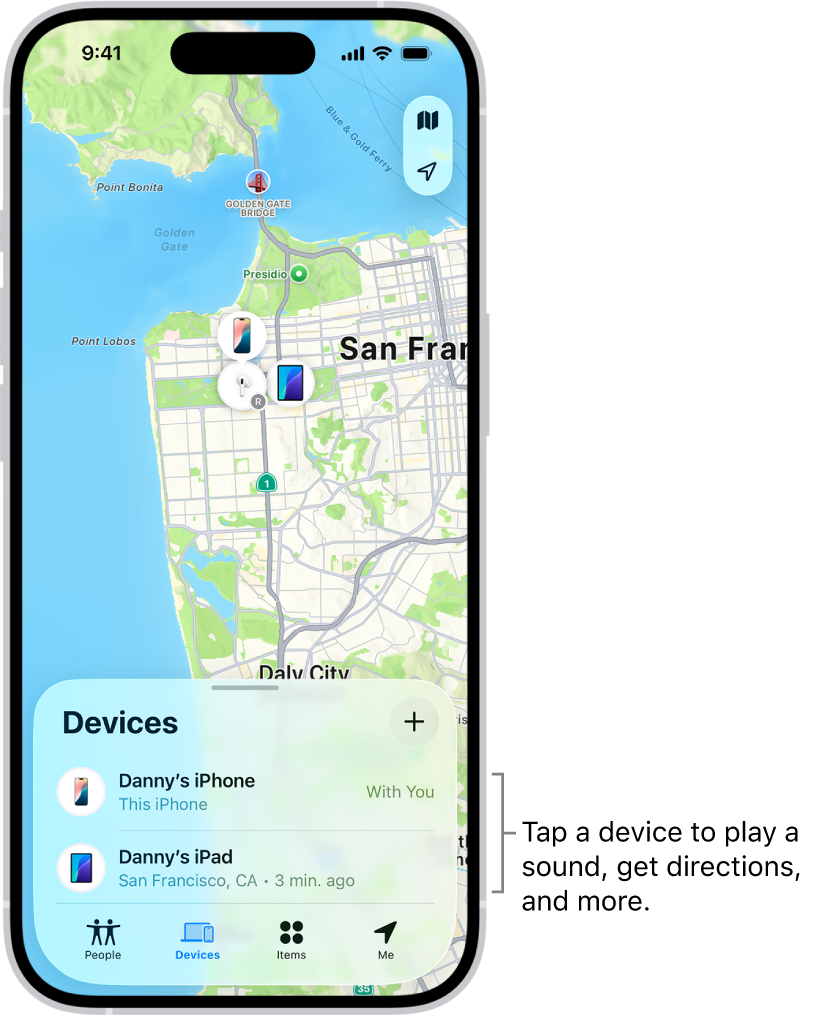
2. Using the “Find My” App on Another Apple Device
If you own an iPad, a Mac, or an Apple Watch, finding your iPhone is incredibly straightforward.
How to Use It:
-
Open the Find My app on your iPad or Mac.
-
Click on the Devices tab at the bottom of the screen.
-
Select your missing iPhone from the list.
-
The map will display its location. You can click “Directions” to open Apple Maps and navigate directly to it.
If you are using a friend’s iPhone to look for your device, do not log them out of their iCloud. Instead, open their Find My app, tap the “Me” tab at the bottom right, and scroll down to select Help a Friend. This opens an iCloud login portal where you can securely sign in without disrupting their phone’s settings.
3. Apple’s Offline Tracking
Modern iPhones (running iOS 15 or later) feature advanced offline tracking capabilities. Even if a thief powers off the iPhone or the battery dies, the phone reserves a tiny amount of power to act like an AirTag. It emits a secure Bluetooth beacon that other passing iPhones will detect and anonymously report to the Find My network. This means you can often track a stolen iPhone even when it appears completely dead.
4. Retracing Steps with Google Maps Timeline (Alternative Method)
If you had the Google Maps app installed on your iPhone with “Location History” enabled, you can use it as a backup tracking method.
-
Log into your Google account on a computer.
-
Go to the Google Maps Timeline feature.
-
Select today’s date.
-
The timeline will display the exact chronological route the phone took before it went offline. If the tracking dot stops moving at a specific restaurant or park, that is where your physical search should begin.
Crucial Steps to Protect Your Data if the Phone is Stolen
If the tracking map shows your phone moving down a highway, or if it is located inside a stranger’s house, you must assume the phone is stolen. Never attempt to physically confront a thief to retrieve your phone. Your physical safety is infinitely more valuable than a piece of hardware.
Instead, pivot immediately from recovery to data protection:
Step 1: Activate Lost Mode / Secure Device
Immediately use the Find My (Apple) or Find My Device (Android) portals to lock the phone. This prevents anyone from bypassing the lock screen, ensuring your photos, emails, and apps remain inaccessible.
Step 2: Change Essential Passwords
Assume the worst-case scenario. Log onto a computer and immediately change the passwords for your primary email accounts (Gmail, Outlook, iCloud). Your email is the master key to resetting passwords for your banking apps, social media, and crypto wallets. Change those passwords next.
Step 3: Enable Two-Factor Authentication (2FA)
If you haven’t already, enable 2FA on all your critical accounts. However, ensure the verification codes are sent to an authenticator app (which is now locked on your missing phone) or a backup email address, rather than via SMS to the stolen phone number.
Step 4: Contact Your Carrier to Blacklist the IMEI
Call your mobile network provider immediately. Ask them to suspend your service and blacklist the device’s IMEI (International Mobile Equipment Identity) number. Blacklisting the IMEI essentially “bricks” the phone on a network level; it will not be able to connect to any cellular tower, even if the thief inserts a new SIM card. This makes the phone useless to sell on the black market.
Step 5: File a Police Report
Contact your local law enforcement agency. While they may not launch a tactical raid to recover a single smartphone, filing a report is a necessary administrative step. You will need the official police report number to file an insurance claim with your carrier or your credit card company to get a replacement device. The police can also legally request tracking data from carriers that you cannot access yourself.
Step 6: Execute a Remote Wipe
If you have lost hope of recovering the device, return to the tracking portal and execute the “Erase Device” command. The moment the phone connects to any network, it will factory reset itself, destroying all your personal data.
Frequently Asked Questions
Is there a free way to track a lost phone? Yes. Both Google’s “Find My Device” and Apple’s “Find My” networks are entirely free to use and are built directly into the respective operating systems. You simply need to log in with the account associated with the lost device.
Can I find a lost iPhone if it is turned off or the battery is dead? Yes, if you have a modern iPhone (iPhone 11 or newer) running iOS 15 or later. These devices utilize the Find My Network to emit a low-energy Bluetooth signal even when powered down, allowing other nearby Apple devices to relay its location to you.
How can I track my lost Android phone without the internet? Samsung Galaxy devices have an “Offline Finding” feature similar to Apple’s network. For other Android devices, if it has no internet connection, you cannot track it in real-time. However, you can check your Google Maps Timeline to see the last recorded location before the phone went offline.
Can I track someone else’s lost phone? You can help a friend track their phone by allowing them to log into their Google Account via the “Sign in as guest” feature on the Android Find My Device app, or by using the “Help a Friend” link at the bottom of the Apple Find My app.
Should I use third-party tracking apps to find my phone? It is highly recommended to stick exclusively to the native tools provided by Google and Apple. Third-party tracking apps found on the web often require you to pay exorbitant fees to unlock the location, and many are disguised malware designed to steal your credentials.
Losing a smartphone is incredibly stressful, but acting quickly and utilizing the built-in tracking tools can dramatically increase your chances of recovery. Take a moment right now to ensure that location services and tracking features are enabled on your current device—preparation is the best defense against loss.